
See what's actually popular on any YouTube channel, right now.
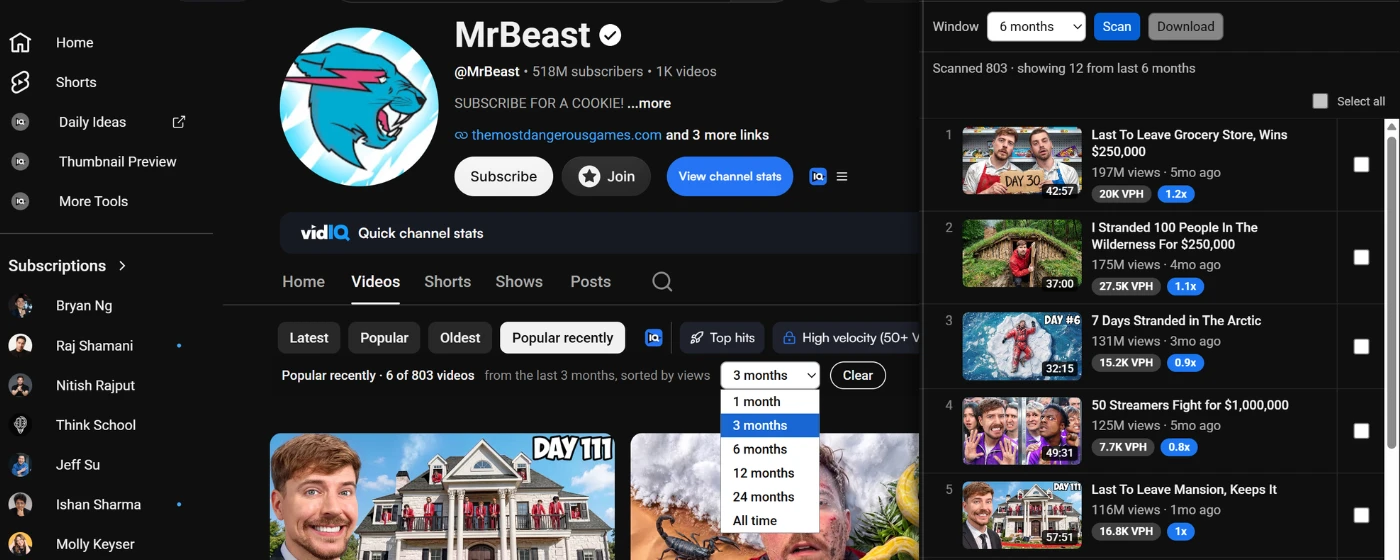
YouTube's own "Popular" sort is all-time only. Popular Recently re-sorts any channel's Videos or Shorts by view count within the last 3, 6, or 12 months (or any window you choose), then lets you export what you find to plan your next video.
No login. No API key. Nothing tracked or sent anywhere, everything runs in your browser.
Five steps from "all-time greatest hits" to "what's working now"
Install
Add it from the Chrome Web Store in one click.
Open a channel
Go to any public channel's Videos or Shorts tab, a single video, or a playlist page.
Click Popular Recently
Use the on-page chip, or the extension icon for a scrollable side panel.
Pick a window
1, 3, 6, 12, 24 months, or all time. Results re-sort instantly.
Browse or export
Select videos and download their info, thumbnails, and transcripts.
Everything you need to research a channel's recent performance
Not just a sort. A complete way to find, study, and save what's working.
Sort by recent popularity
Re-sort any channel's Videos or Shorts tab by view count within 1, 3, 6, 12, 24 months, or all time, not YouTube's all-time-only "Popular" sort.
Two ways to browse
Use the on-page chip to re-sort the real YouTube grid in place, or open the side panel for a scrollable, exportable ranked list.
Bulk export
Select multiple videos and download their info (views, publish date, likes, thumbnails) plus a thumbnail PDF, zipped together in one click.
Single-video export
On any video's own page, download its exact stats and full timed transcript instantly, ready to drop into an AI tool.
Playlist export
Export an entire playlist's info and thumbnails in one go, no selection needed, no size cap.
VidIQ-aware
Automatically shows VidIQ's views-per-hour and outlier score alongside your results, if you already have VidIQ installed. Optional, not required.
Resizable, remembers your place
Drag the side panel to the width you want, and reopen it later without rescanning the channel.
Privacy-first
No sign-in, no API key. Operates entirely in your browser, nothing tracked or sent anywhere.
What's next
On the roadmap, not built yet.
Instagram support
The same recency-based popularity filter, coming to Instagram after YouTube.
Built for anyone who studies YouTube channels
Content research
Instantly see what's working for a channel right now instead of scrolling past old outliers.
Competitor analysis
Size up what a competitor's recent uploads are actually doing, not their all-time best video from years ago.
Content planning
Export titles, thumbnails, and transcripts of top performers to study patterns for your next video.
Trend spotting
Compare recent performance across a channel's Videos and Shorts to see where momentum is building.
AI-powered strategy analysis
Export a channel's real data and feed it to Claude, ChatGPT, or NotebookLM to reverse-engineer what's actually working for them right now, for free.
Nothing leaves your browser
Popular Recently doesn't collect, store, or sell any personal data. No login, no API key, no backend server. Read the full Privacy Policy.
- No account or sign-in required
- No YouTube Data API key used
- Exports save straight to your device
Questions people ask
Is it free?
Yes. Popular Recently is free to install and use, with no account required.
Do I need to log in to YouTube or Google?
No. Popular Recently never asks for a login and never uses the YouTube Data API. It only reads public page content.
Is my data safe?
Everything runs locally in your browser. Nothing is tracked, collected, or sent to any server, there isn't one. See the Privacy Policy for details.
Does it work on any channel, or just mine?
Any public YouTube channel, video, or playlist. It's a research tool for studying any creator's recent performance, not just your own.
Does it work on Shorts, or just regular videos?
Both. The chip and side panel work on a channel's Videos tab and its Shorts tab.
Do I need VidIQ installed?
No. VidIQ integration is optional, if you already have it installed, Popular Recently shows its views-per-hour and outlier data alongside your results automatically.
Stop guessing what's working. See it.
Add Popular Recently to Chrome and re-sort your first channel in under a minute.
Add to Chrome — it's free